> ## Documentation Index
> Fetch the complete documentation index at: https://snowglobe.so/docs/llms.txt
> Use this file to discover all available pages before exploring further.
# Agent Profile Calibration
> Automatically calibrate Snowglobe's tool mocking to match your agent's real tools, so simulations reflect production behavior.
## Overview
Snowglobe runs simulations against your agent by mocking the tool calls your agent makes at runtime. For those simulations to reflect how your agent actually behaves in production, the mocked tool responses need to match the shape, values, and behaviors your real tools would return.
**Agent profiles** are versioned artifacts that capture this mocking behavior. When your agent connects to Snowglobe, we capture your tool specs and run a **calibration** job that tunes our mocking to line up with your tools. The result is consistent, realistic simulations without you hand-writing fixtures.
## When a new agent profile is created
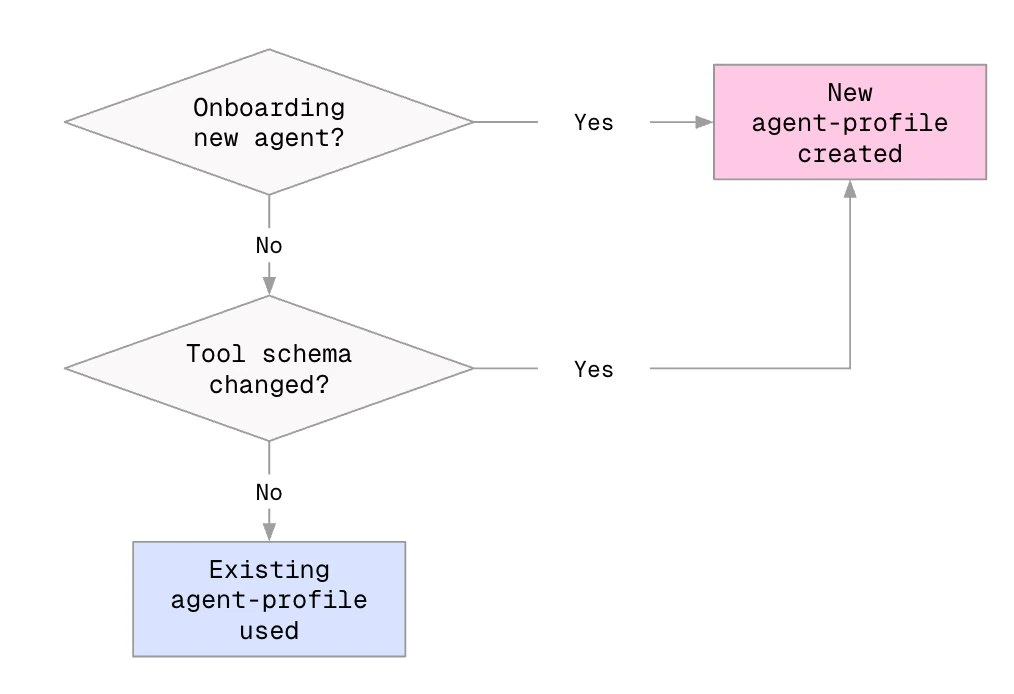
Calibration kicks off automatically in two cases:
1. **When you onboard a new agent** to Snowglobe.
2. **Any time your tool schema changes** — adding, removing, renaming, or changing the schema of a tool — and you reconnect.
If your tool specs haven't changed, no new calibration runs. Snowglobe reuses the existing calibrated agent profile for that tool set.
 ## Calibration lifecycle
Every agent profile moves through these statuses:
## Calibration lifecycle
Every agent profile moves through these statuses:
 | Status | Meaning |
| ------------- | ---------------------------------------------------- |
| `Pending` | Queued, will start soon |
| `In progress` | Currently calibrating |
| `Ready` | Calibration complete and ready to use in simulations |
| `Failed` | Calibration did not complete. Reconnect to retry. |
Calibration typically takes **several hours** before an agent profile goes live. See [Running simulations while calibration is in progress](#running-simulations-while-calibration-is-in-progress) below for what you can and can't do during that window.
## Checking agent profile status
### Via CLI
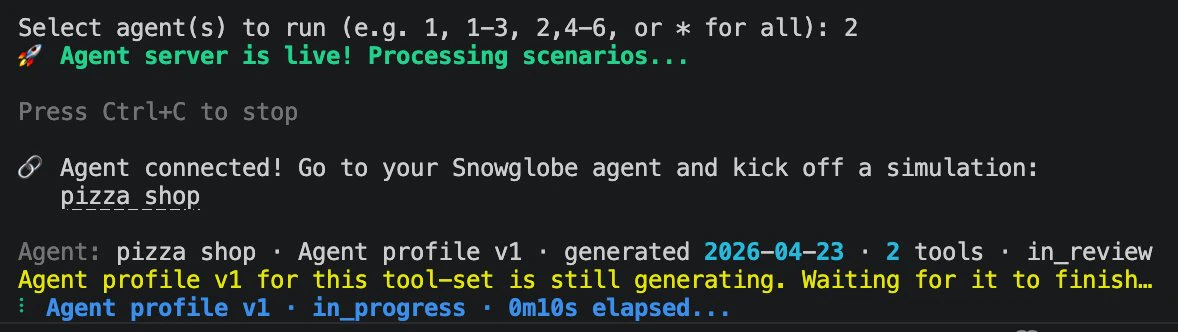
Run `snowglobe connect --simulation-id `. The CLI reports calibration status for your current tool set:
| Status | Meaning |
| ------------- | ---------------------------------------------------- |
| `Pending` | Queued, will start soon |
| `In progress` | Currently calibrating |
| `Ready` | Calibration complete and ready to use in simulations |
| `Failed` | Calibration did not complete. Reconnect to retry. |
Calibration typically takes **several hours** before an agent profile goes live. See [Running simulations while calibration is in progress](#running-simulations-while-calibration-is-in-progress) below for what you can and can't do during that window.
## Checking agent profile status
### Via CLI
Run `snowglobe connect --simulation-id `. The CLI reports calibration status for your current tool set:
 ### Via Snowglobe UI
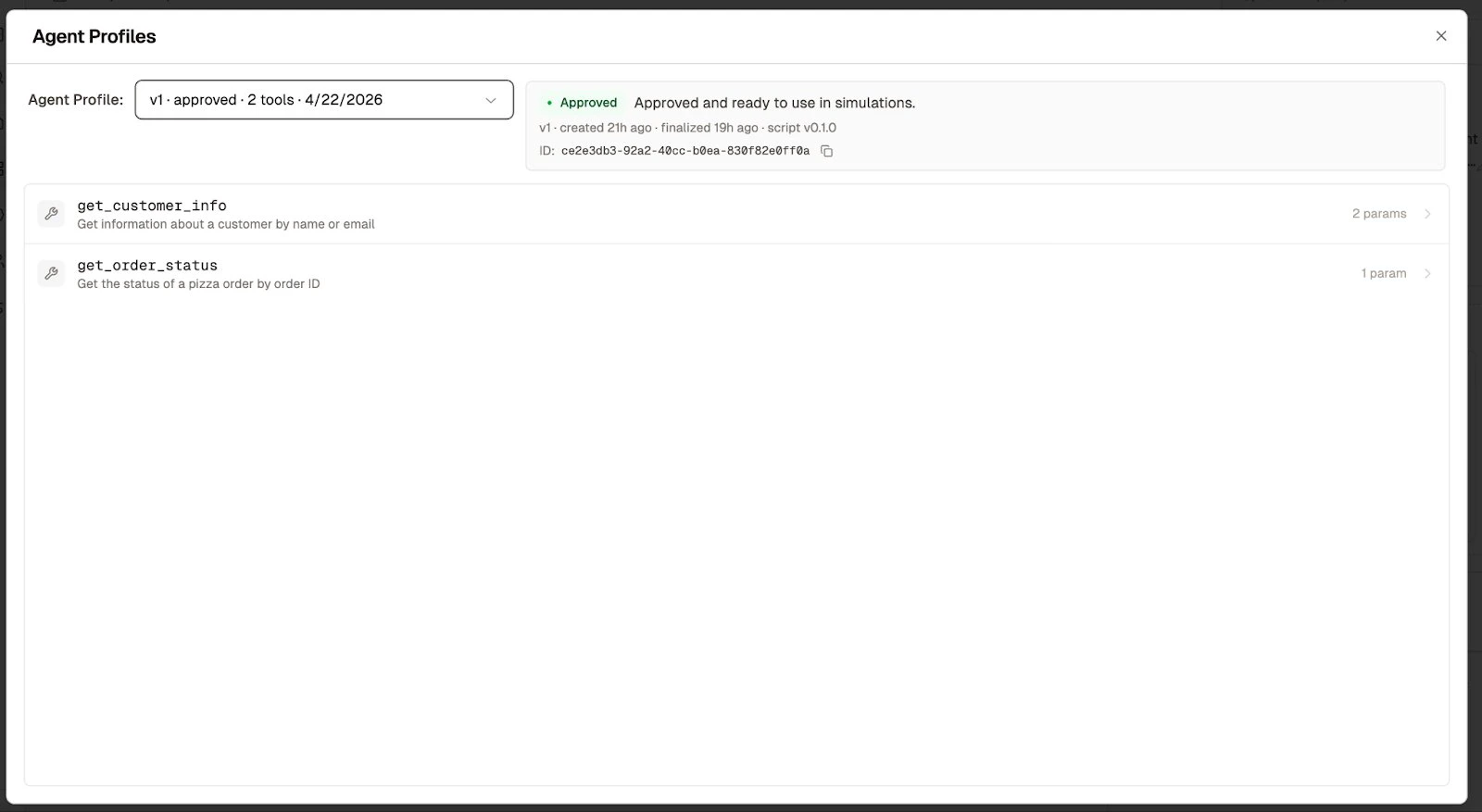
Your agent's **Details** page has an **Agent Profiles** modal that lists every version. Each entry shows its status, the tool set it was calibrated against, creation and finalization timestamps, and its profile ID.
### Via Snowglobe UI
Your agent's **Details** page has an **Agent Profiles** modal that lists every version. Each entry shows its status, the tool set it was calibrated against, creation and finalization timestamps, and its profile ID.
 ## Triggering calibration
Calibration is triggered automatically when you connect a new agent.
As of client `1.0.0`, `connect` replaces the previous `start` command and `--simulation-id` is required. Calibration runs during the `connect` startup preflight, so connecting to any simulation (or launching one with [`snowglobe simulate`](/snowglobe/docs/connect/launch-a-simulation)) triggers it.
If you're adding or changing tools for an existing agent, trigger calibration by running `snowglobe connect --simulation-id ` locally or in a staging environment. Wait for the new agent profile to reach `Ready`. Subsequent CI runs will use that profile without re-running calibration.
## Running simulations while calibration is in progress
Each simulation must run in the context of a calibrated agent profile. What you can do during calibration depends on whether you've calibrated this agent before:
* **New agent, first-time calibration:** No prior agent profile exists, so you'll need to wait for calibration to reach `Ready` before running any simulations.
* **Existing agent, tool schema changed:** You can continue running simulations against a previously calibrated agent profile — but only with the version of the agent that profile was calibrated for. Pin its ID explicitly when launching the simulation (see [API reference](#api-reference)). Once the new profile is ready, switch over.
## Using agent profiles in CI/CD
Calibration should be treated as a prerequisite to simulation runs whenever your tool schemas change. Two patterns are supported — pick the one that fits your team's workflow.
### Option A: Calibrate ahead of time in development
When you add or change tools, run `snowglobe connect --simulation-id ` locally or in a staging environment. Wait for the new agent profile to reach `Ready`. Subsequent CI runs will use that profile without re-running calibration.
This is the recommended pattern for most teams. It keeps CI runs fast and deterministic.
### Option B: Kick off calibration from CI/CD
Run `snowglobe connect --simulation-id ` non-interactively at the top of your CI job. If your tool specs haven't changed, the most recent calibrated agent profile is reused and simulations run immediately. If your specs have changed, a new calibration job starts in the background — and because simulations can't run without a calibrated profile for the current tool set, that CI run needs to fail fast.
Mark the build as "calibration required" and skip the simulation step. Re-run CI once the new profile reaches `Ready`.
With this pattern, calibration follows the same code-change cadence as the rest of your pipeline without needing a separate dev-environment step — at the cost of an extra CI run the first time after any tool schema change.
## Client wrapper changes
**No code changes are needed.** Your Snowglobe Client Wrapper will automatically use the most recent calibrated agent profile for your agent. The only time you need to think about profile selection is if you want to pin a specific older version — see [API reference](#api-reference) below.
## API reference
By default, your Snowglobe Client Wrapper handles agent profile selection automatically — you don't need to pass `tuning_version_id` when launching simulations. The most recent calibrated profile is used.
You only need the code below if you want to **pin a simulation to a specific agent profile version** — for example, to reproduce an earlier run, or to keep running simulations against a known-good profile while a new one calibrates.
### Launch a simulation pinned to a specific agent profile
```python theme={null}
import os
import requests
API_URL = os.environ["SNOWGLOBE_API_URL"]
API_KEY = os.environ["SNOWGLOBE_API_KEY"]
APPLICATION_ID = os.environ["APPLICATION_ID"]
BUILD_ID = os.environ["BUILD_ID"]
headers = {"X-API-Key": API_KEY}
# 1. Get the most recent agent profile pinned by your wrapper
resp = requests.get(
f"{API_URL}/api/agents/{APPLICATION_ID}/tuning-versions/recent",
headers=headers,
)
resp.raise_for_status()
tuning_version_id = resp.json()["recent"][0]["id"]
# 2. Launch a simulation, explicitly pinning that agent profile
resp = requests.post(
f"{API_URL}/api/agents/{APPLICATION_ID}/experiments",
headers=headers,
json={
"name": f"ci-run-{BUILD_ID}",
"tuning_version_id": tuning_version_id,
"persona_count": 10,
},
)
resp.raise_for_status()
```
The `/tuning-versions/recent` endpoint returns agent profiles pinned by an active wrapper in the last 10 minutes, newest first. If nothing is returned, no wrapper is currently running or the heartbeat pin has expired.
### How to pass `tuning_version_id`
| Value in request body | Behavior |
| ----------------------------------- | ---------------------------------------------------------------------------- |
| Key omitted entirely | **Default.** Inherit the most recent heartbeat pin from the past 10 minutes. |
| `"tuning_version_id": "abc-123..."` | Run the simulation pinned to that specific calibrated agent profile. |
For CI runs where you want full reproducibility, pass an explicit `tuning_version_id` so your simulation result is tied to a known agent profile and your logs tell you exactly what you ran against.
### List all agent profile versions
```python theme={null}
import os
import requests
resp = requests.get(
f"{os.environ['SNOWGLOBE_API_URL']}/api/agents/{os.environ['APPLICATION_ID']}/tuning-versions",
headers={"X-API-Key": os.environ["SNOWGLOBE_API_KEY"]},
)
resp.raise_for_status()
print(resp.json())
```
Returns every agent profile for the agent, newest first, with status, version number, and timestamps.
## FAQ
**Can I run simulations before calibration finishes?** No. Each simulation must run in the context of a calibrated agent profile. You can use a previously calibrated profile, but only with the version of the agent it was calibrated for — pin its `tuning_version_id` when launching.
**What if I change my tool specs mid-calibration?** The in-progress calibration continues, but your new spec set starts its own calibration job. Only one calibration job per agent can be in flight at a time, so you may get a `409` response if you reconnect with different specs before the current job finishes. Wait for the current job to finish, then reconnect.
**What happens if calibration fails?** The version is marked `Failed` and you can reconnect to retry. If failures persist, [contact support](#support).
**Can I use an older agent profile?** Yes. Previously calibrated versions remain usable. Pass their `tuning_version_id` when launching a simulation via the API, or select them in the Snowglobe UI.
**Do agent profile versions expire?** Calibrated agent profiles do not expire. They stay available as long as the agent exists. The "recent" heartbeat pin expires 10 minutes after your wrapper disconnects.
## Support
Questions or issues? Contact support and include your agent ID and the agent profile ID from the UI or API.
## Triggering calibration
Calibration is triggered automatically when you connect a new agent.
As of client `1.0.0`, `connect` replaces the previous `start` command and `--simulation-id` is required. Calibration runs during the `connect` startup preflight, so connecting to any simulation (or launching one with [`snowglobe simulate`](/snowglobe/docs/connect/launch-a-simulation)) triggers it.
If you're adding or changing tools for an existing agent, trigger calibration by running `snowglobe connect --simulation-id ` locally or in a staging environment. Wait for the new agent profile to reach `Ready`. Subsequent CI runs will use that profile without re-running calibration.
## Running simulations while calibration is in progress
Each simulation must run in the context of a calibrated agent profile. What you can do during calibration depends on whether you've calibrated this agent before:
* **New agent, first-time calibration:** No prior agent profile exists, so you'll need to wait for calibration to reach `Ready` before running any simulations.
* **Existing agent, tool schema changed:** You can continue running simulations against a previously calibrated agent profile — but only with the version of the agent that profile was calibrated for. Pin its ID explicitly when launching the simulation (see [API reference](#api-reference)). Once the new profile is ready, switch over.
## Using agent profiles in CI/CD
Calibration should be treated as a prerequisite to simulation runs whenever your tool schemas change. Two patterns are supported — pick the one that fits your team's workflow.
### Option A: Calibrate ahead of time in development
When you add or change tools, run `snowglobe connect --simulation-id ` locally or in a staging environment. Wait for the new agent profile to reach `Ready`. Subsequent CI runs will use that profile without re-running calibration.
This is the recommended pattern for most teams. It keeps CI runs fast and deterministic.
### Option B: Kick off calibration from CI/CD
Run `snowglobe connect --simulation-id ` non-interactively at the top of your CI job. If your tool specs haven't changed, the most recent calibrated agent profile is reused and simulations run immediately. If your specs have changed, a new calibration job starts in the background — and because simulations can't run without a calibrated profile for the current tool set, that CI run needs to fail fast.
Mark the build as "calibration required" and skip the simulation step. Re-run CI once the new profile reaches `Ready`.
With this pattern, calibration follows the same code-change cadence as the rest of your pipeline without needing a separate dev-environment step — at the cost of an extra CI run the first time after any tool schema change.
## Client wrapper changes
**No code changes are needed.** Your Snowglobe Client Wrapper will automatically use the most recent calibrated agent profile for your agent. The only time you need to think about profile selection is if you want to pin a specific older version — see [API reference](#api-reference) below.
## API reference
By default, your Snowglobe Client Wrapper handles agent profile selection automatically — you don't need to pass `tuning_version_id` when launching simulations. The most recent calibrated profile is used.
You only need the code below if you want to **pin a simulation to a specific agent profile version** — for example, to reproduce an earlier run, or to keep running simulations against a known-good profile while a new one calibrates.
### Launch a simulation pinned to a specific agent profile
```python theme={null}
import os
import requests
API_URL = os.environ["SNOWGLOBE_API_URL"]
API_KEY = os.environ["SNOWGLOBE_API_KEY"]
APPLICATION_ID = os.environ["APPLICATION_ID"]
BUILD_ID = os.environ["BUILD_ID"]
headers = {"X-API-Key": API_KEY}
# 1. Get the most recent agent profile pinned by your wrapper
resp = requests.get(
f"{API_URL}/api/agents/{APPLICATION_ID}/tuning-versions/recent",
headers=headers,
)
resp.raise_for_status()
tuning_version_id = resp.json()["recent"][0]["id"]
# 2. Launch a simulation, explicitly pinning that agent profile
resp = requests.post(
f"{API_URL}/api/agents/{APPLICATION_ID}/experiments",
headers=headers,
json={
"name": f"ci-run-{BUILD_ID}",
"tuning_version_id": tuning_version_id,
"persona_count": 10,
},
)
resp.raise_for_status()
```
The `/tuning-versions/recent` endpoint returns agent profiles pinned by an active wrapper in the last 10 minutes, newest first. If nothing is returned, no wrapper is currently running or the heartbeat pin has expired.
### How to pass `tuning_version_id`
| Value in request body | Behavior |
| ----------------------------------- | ---------------------------------------------------------------------------- |
| Key omitted entirely | **Default.** Inherit the most recent heartbeat pin from the past 10 minutes. |
| `"tuning_version_id": "abc-123..."` | Run the simulation pinned to that specific calibrated agent profile. |
For CI runs where you want full reproducibility, pass an explicit `tuning_version_id` so your simulation result is tied to a known agent profile and your logs tell you exactly what you ran against.
### List all agent profile versions
```python theme={null}
import os
import requests
resp = requests.get(
f"{os.environ['SNOWGLOBE_API_URL']}/api/agents/{os.environ['APPLICATION_ID']}/tuning-versions",
headers={"X-API-Key": os.environ["SNOWGLOBE_API_KEY"]},
)
resp.raise_for_status()
print(resp.json())
```
Returns every agent profile for the agent, newest first, with status, version number, and timestamps.
## FAQ
**Can I run simulations before calibration finishes?** No. Each simulation must run in the context of a calibrated agent profile. You can use a previously calibrated profile, but only with the version of the agent it was calibrated for — pin its `tuning_version_id` when launching.
**What if I change my tool specs mid-calibration?** The in-progress calibration continues, but your new spec set starts its own calibration job. Only one calibration job per agent can be in flight at a time, so you may get a `409` response if you reconnect with different specs before the current job finishes. Wait for the current job to finish, then reconnect.
**What happens if calibration fails?** The version is marked `Failed` and you can reconnect to retry. If failures persist, [contact support](#support).
**Can I use an older agent profile?** Yes. Previously calibrated versions remain usable. Pass their `tuning_version_id` when launching a simulation via the API, or select them in the Snowglobe UI.
**Do agent profile versions expire?** Calibrated agent profiles do not expire. They stay available as long as the agent exists. The "recent" heartbeat pin expires 10 minutes after your wrapper disconnects.
## Support
Questions or issues? Contact support and include your agent ID and the agent profile ID from the UI or API.