Overview
Snowglobe runs simulations against your agent by mocking the tool calls your agent makes at runtime. For those simulations to reflect how your agent actually behaves in production, the mocked tool responses need to match the shape, values, and behaviors your real tools would return. Agent profiles are versioned artifacts that capture this mocking behavior. When your agent connects to Snowglobe, we capture your tool specs and run a calibration job that tunes our mocking to line up with your tools. The result is consistent, realistic simulations without you hand-writing fixtures.When a new agent profile is created
Calibration kicks off automatically in two cases:- When you onboard a new agent to Snowglobe.
- Any time your tool schema changes — adding, removing, renaming, or changing the schema of a tool — and you reconnect.
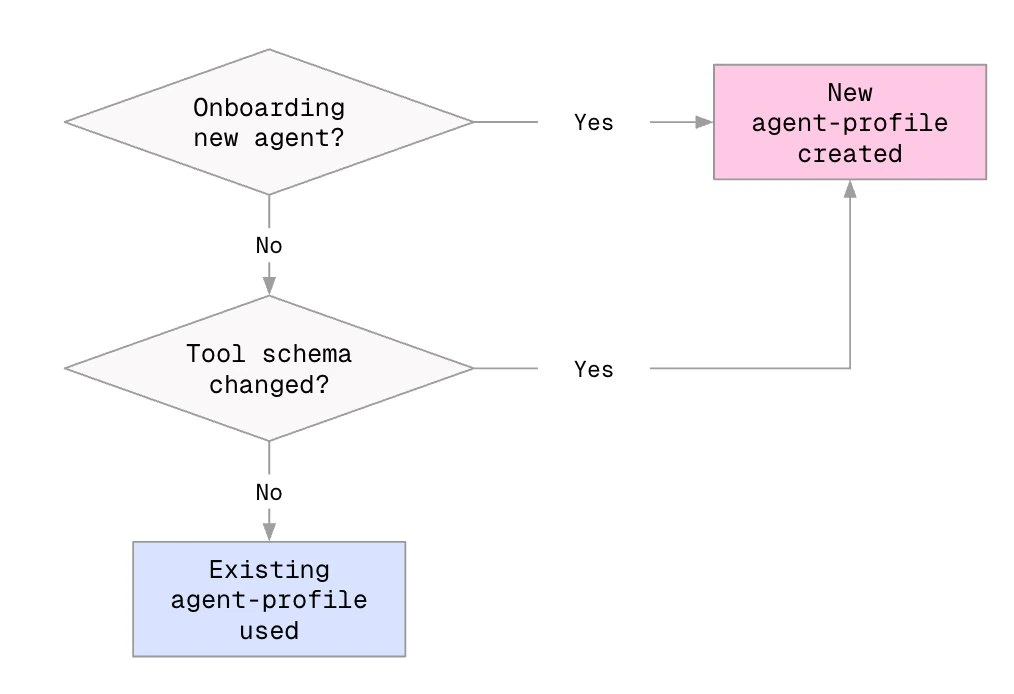
Calibration lifecycle
Every agent profile moves through these statuses:
Calibration typically takes several hours before an agent profile goes live. See Running simulations while calibration is in progress below for what you can and can’t do during that window.
Checking agent profile status
Via CLI
Runsnowglobe connect --simulation-id <simulation-id>. The CLI reports calibration status for your current tool set:
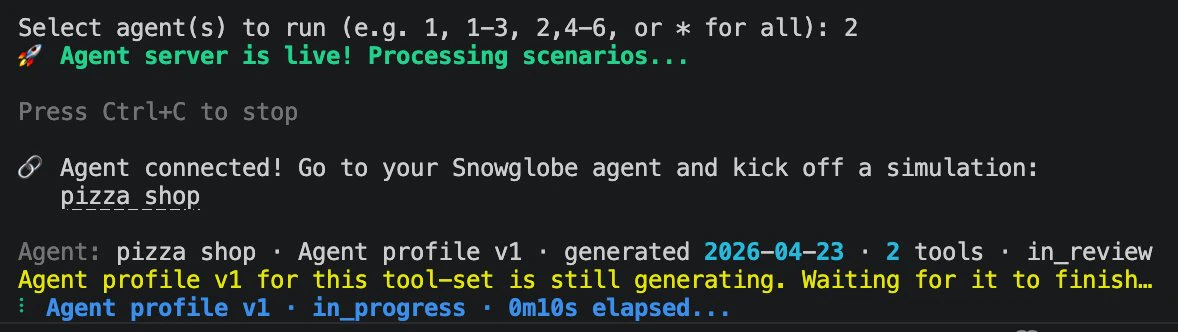
Via Snowglobe UI
Your agent’s Details page has an Agent Profiles modal that lists every version. Each entry shows its status, the tool set it was calibrated against, creation and finalization timestamps, and its profile ID.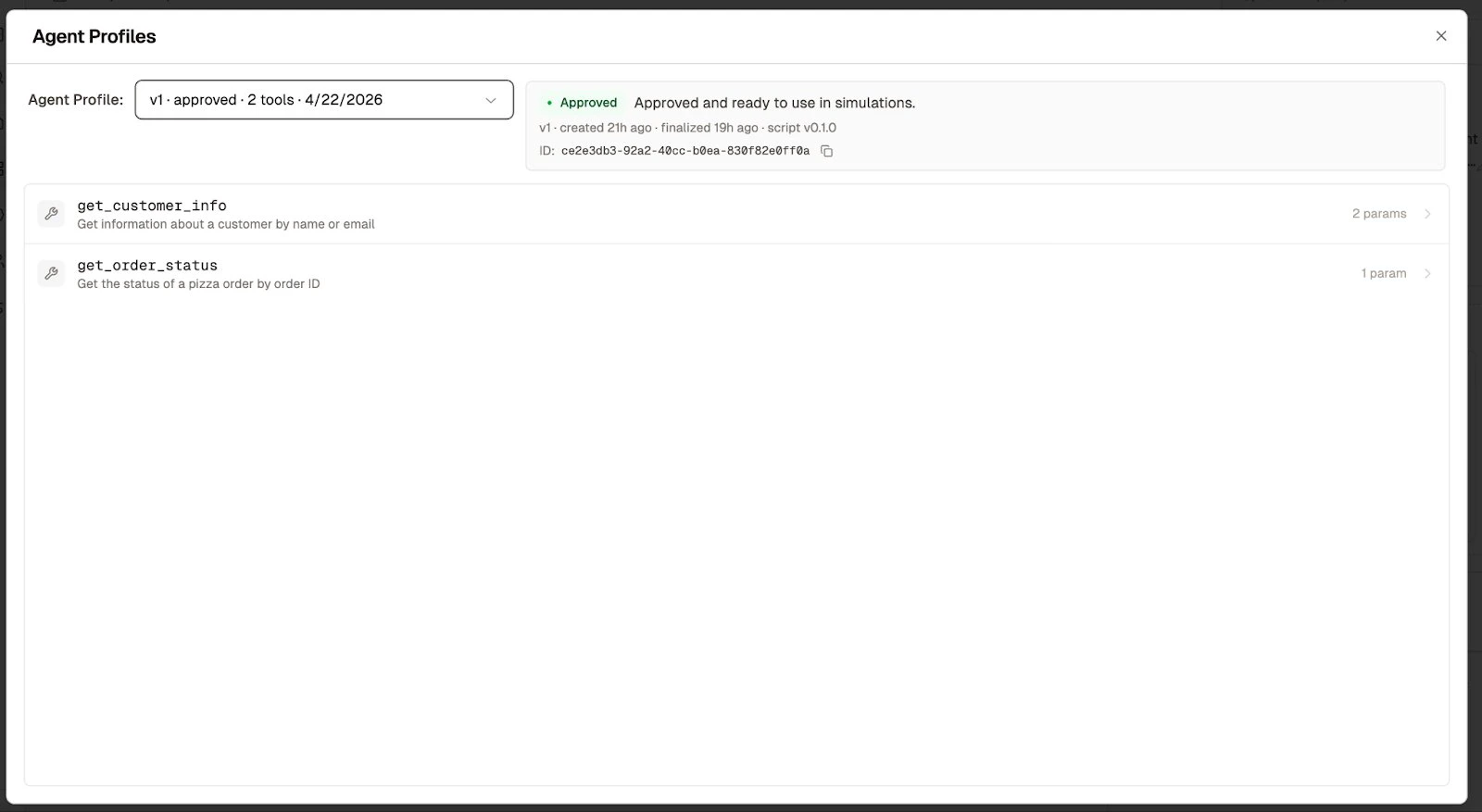
Triggering calibration
Calibration is triggered automatically when you connect a new agent.As of client
1.0.0, connect replaces the previous start command and --simulation-id is required. Calibration runs during the connect startup preflight, so connecting to any simulation (or launching one with snowglobe simulate) triggers it.snowglobe connect --simulation-id <simulation-id> locally or in a staging environment. Wait for the new agent profile to reach Ready. Subsequent CI runs will use that profile without re-running calibration.
Running simulations while calibration is in progress
Each simulation must run in the context of a calibrated agent profile. What you can do during calibration depends on whether you’ve calibrated this agent before:- New agent, first-time calibration: No prior agent profile exists, so you’ll need to wait for calibration to reach
Readybefore running any simulations. - Existing agent, tool schema changed: You can continue running simulations against a previously calibrated agent profile — but only with the version of the agent that profile was calibrated for. Pin its ID explicitly when launching the simulation (see API reference). Once the new profile is ready, switch over.
Using agent profiles in CI/CD
Calibration should be treated as a prerequisite to simulation runs whenever your tool schemas change. Two patterns are supported — pick the one that fits your team’s workflow.Option A: Calibrate ahead of time in development
When you add or change tools, runsnowglobe connect --simulation-id <simulation-id> locally or in a staging environment. Wait for the new agent profile to reach Ready. Subsequent CI runs will use that profile without re-running calibration.
This is the recommended pattern for most teams. It keeps CI runs fast and deterministic.
Option B: Kick off calibration from CI/CD
Runsnowglobe connect --simulation-id <simulation-id> non-interactively at the top of your CI job. If your tool specs haven’t changed, the most recent calibrated agent profile is reused and simulations run immediately. If your specs have changed, a new calibration job starts in the background — and because simulations can’t run without a calibrated profile for the current tool set, that CI run needs to fail fast.
Mark the build as “calibration required” and skip the simulation step. Re-run CI once the new profile reaches Ready.
With this pattern, calibration follows the same code-change cadence as the rest of your pipeline without needing a separate dev-environment step — at the cost of an extra CI run the first time after any tool schema change.
Client wrapper changes
No code changes are needed. Your Snowglobe Client Wrapper will automatically use the most recent calibrated agent profile for your agent. The only time you need to think about profile selection is if you want to pin a specific older version — see API reference below.API reference
By default, your Snowglobe Client Wrapper handles agent profile selection automatically — you don’t need to passtuning_version_id when launching simulations. The most recent calibrated profile is used.
You only need the code below if you want to pin a simulation to a specific agent profile version — for example, to reproduce an earlier run, or to keep running simulations against a known-good profile while a new one calibrates.
Launch a simulation pinned to a specific agent profile
/tuning-versions/recent endpoint returns agent profiles pinned by an active wrapper in the last 10 minutes, newest first. If nothing is returned, no wrapper is currently running or the heartbeat pin has expired.
How to pass tuning_version_id
For CI runs where you want full reproducibility, pass an explicit
tuning_version_id so your simulation result is tied to a known agent profile and your logs tell you exactly what you ran against.
List all agent profile versions
FAQ
Can I run simulations before calibration finishes? No. Each simulation must run in the context of a calibrated agent profile. You can use a previously calibrated profile, but only with the version of the agent it was calibrated for — pin itstuning_version_id when launching.
What if I change my tool specs mid-calibration? The in-progress calibration continues, but your new spec set starts its own calibration job. Only one calibration job per agent can be in flight at a time, so you may get a 409 response if you reconnect with different specs before the current job finishes. Wait for the current job to finish, then reconnect.
What happens if calibration fails? The version is marked Failed and you can reconnect to retry. If failures persist, contact support.
Can I use an older agent profile? Yes. Previously calibrated versions remain usable. Pass their tuning_version_id when launching a simulation via the API, or select them in the Snowglobe UI.
Do agent profile versions expire? Calibrated agent profiles do not expire. They stay available as long as the agent exists. The “recent” heartbeat pin expires 10 minutes after your wrapper disconnects.